Task Project Management Software for Agencies Sharing People

Most task project management software is built on a quiet assumption: the scarce thing in a project is the work. Give every task an owner, a due date and a status, and the board will tell you whether you are on track. That logic holds beautifully when each person works on one thing at a time.
Agencies do not work that way. A single designer might sit on three client accounts, a developer splits a week between a build and support, and the account manager who scoped the job is also the one reviewing it. The task board shows all of that work as tidy, assigned rows. It rarely shows you that the same person is expected to deliver four days of effort in three.
That gap is the reason so many agencies end up running two systems: one for the work and one for the people. Understanding where the boundary sits makes the buying decision much simpler.
The assumption baked into most task tools
Look at how the popular tools describe themselves. Asana is a work management platform for managing projects and tasks, creating projects, assigning work to teammates and allocating effort. Trello visualises projects as lists pinned to digital bulletin boards. Basecamp and Monday.com are positioned as all-in-one solutions for task management and communication. Smartsheet blends project management, task management, automation and spreadsheet-style collaboration into one tool. Todoist focuses on organising tasks, setting reminders, collaborating and tracking productivity.
Every one of those descriptions is about work moving forward. None of them promise to tell you whether the person you just assigned is already committed elsewhere. Assignment is not the same as availability, and on a shared-resource team the difference is where budgets quietly leak.
What task project management software genuinely solves
None of this makes task tools a bad purchase. They solve real delivery problems, and for most agencies they are non-negotiable.
-
Clear ownership of individual pieces of work, so nothing sits unassigned.
-
Status and progress visibility inside a single project, which keeps clients and internal reviewers aligned.
-
Customisation for different workflows, which ClickUp leans into heavily.
-
Centralised documentation and workflows, the strength Notion is known for.
-
Automation of repetitive steps and spreadsheet-style tracking, which Smartsheet combines in one platform.
-
Personal task discipline through reminders and prioritisation, the core of Todoist.
-
Forward planning and schedule monitoring, which tools such as Tempo Planner provide by letting users create plans, monitor progress and identify potential problems.
If your only problem is that work gets lost between brief and delivery, a task tool will fix a large part of it. The trouble starts when you assume it also answers the question of who has room for the next job.

Where the task view runs out
A task board is organised by project, and agencies are organised by people. That mismatch produces a predictable set of blind spots.
First, load is invisible. Each project board looks reasonable on its own, so three boards at eighty per cent each read as fine until you add them together. Second, there is no forward view of capacity, only a backward view of what was completed. Third, billable and non-billable time blur together, so internal work quietly eats the hours that were meant to fund it. Fourth, skills are stored informally in people's heads, which means the same two senior people get requested for everything.
Agencies that share people across accounts feel all four problems at once, and they usually start feeling them in the same week of the month.
The questions your team asks every Monday
Before comparing features, write down the questions you actually need answered. In most shared-resource agencies the list looks like this:
-
Who has genuine capacity on Thursday afternoon, not just a free slot on a calendar?
-
Can we accept this new retainer without moving an existing deadline?
-
Which people have done this type of work before, and are any of them available?
-
Are we over-servicing this client relative to what we charged?
-
What happens to the schedule if someone takes leave or a project slips?
Each question crosses project boundaries. That is precisely why a tool that lives inside one project at a time struggles to answer it, no matter how well the boards are configured.
Why a resource layer changes the buying decision
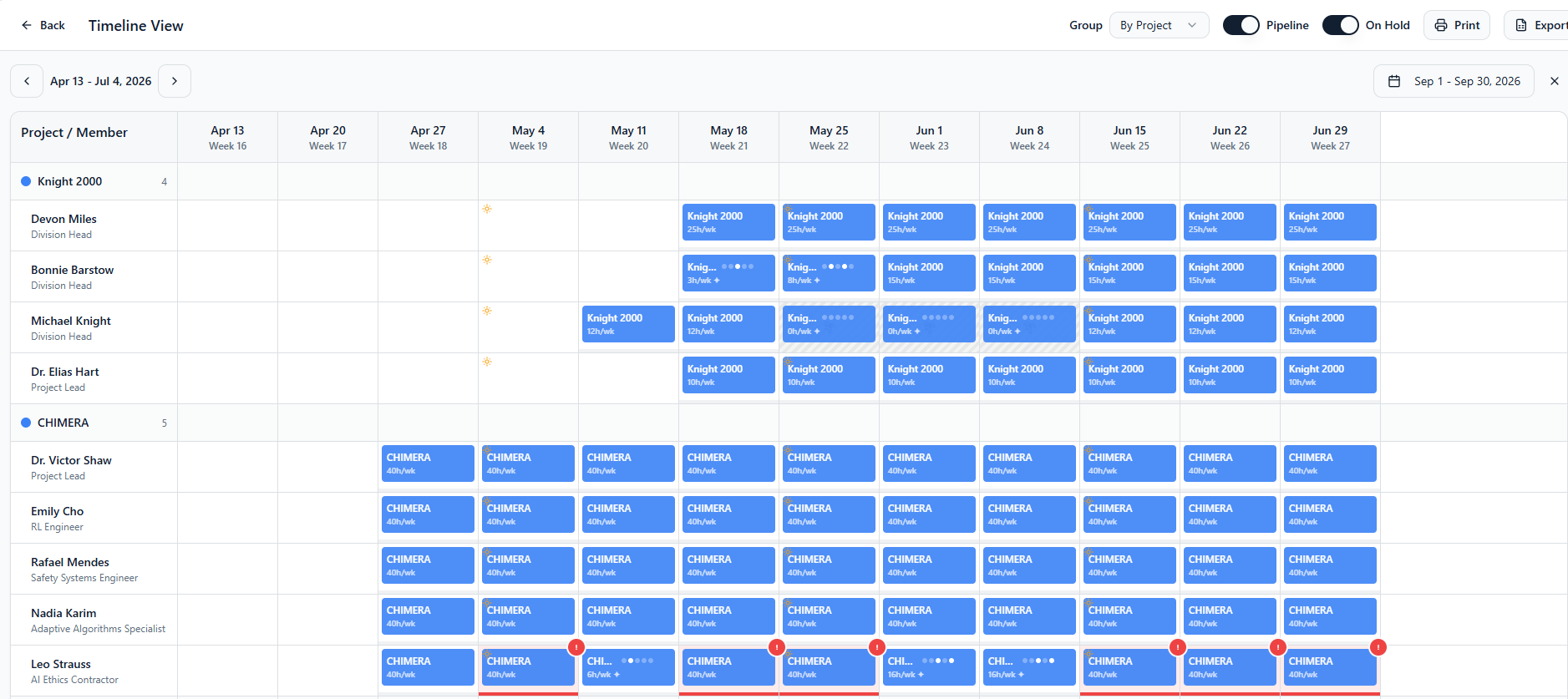
A resource management layer sits above your projects rather than inside them. Instead of asking what is happening on the Acme account, it asks what every person is committed to across all accounts, this week and next month.
Platforms built for this purpose, such as Avai-lability, track team utilisation, allocate shared resources across projects and forecast revenue. The relevant capability is the cross-project view of availability and allocation, combined with capacity planning that flags overallocation and burnout before it shows up in a missed deadline. Skills matching and filtering by skill, team, role and availability answers the "who can do this" question directly. Role-based access levels (Owner, Admin, Manager, Member and Viewer) let you show delivery managers the whole picture without giving finance or contractors the same access.
The conversational side matters more than it sounds. When a project manager can ask a natural-language question about availability and get an answer without waiting on a PMO coordinator or rebuilding a spreadsheet, they ask more often, and small conflicts get resolved while they are still small.
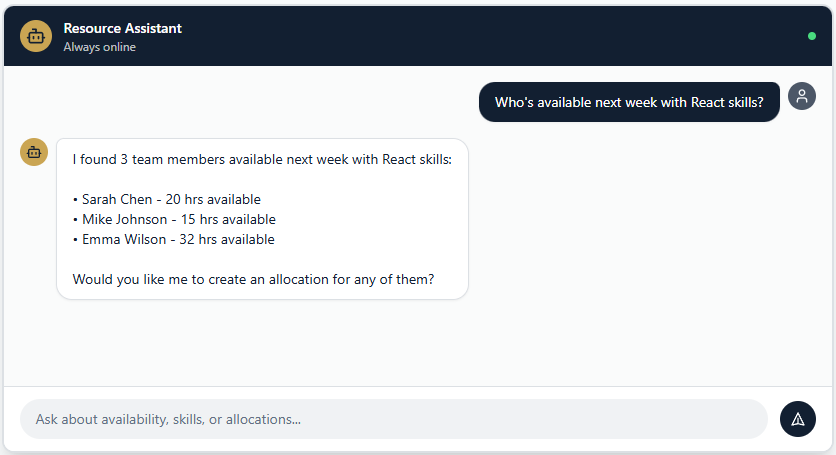
Ask about availability, skills or allocations
What to look for when you compare options
Price per seat is a poor headline metric for this category, because the cost of a bad allocation decision is measured in margin, not licences. Prioritise the following instead.
-
A single view of every person across every project, not a per-project report.
-
Forward-looking capacity, so you can see next month as well as this week.
-
Billable versus non-billable splits, since internal work is where utilisation quietly disappears.
-
Skills data attached to people and searchable in plain language.
-
Permissions that reflect how your agency actually works, with managers able to see and adjust load.
-
An honest integration story with whatever task tool already runs your delivery.
For transparency, published per-resource monthly pricing from Avai-lability sits at a Standard tier and a Pro tier, with custom pricing for Enterprise, and both published tiers are calculated per resource rather than per project. Confirm current numbers directly on the vendor's pricing page before you build a business case.
Making the two layers work together
You do not need to abandon the task tool your team already knows. The practical pattern is to keep the task tool as the record of delivery and let the resource layer be the single source of truth for who is committed where.
Three habits make that split hold. Name projects identically in both systems so allocations map cleanly. Do the allocation review weekly and in the same meeting, not in three separate threads. And give one person the authority to move work between people, because shared pools fail when everyone can add load and nobody can rebalance it.

Common mistakes agencies make
The same failure modes show up across professional services firms, and most are avoidable.
-
Buying a task tool for its resource features and then never configuring the resource side.
-
Tracking time after the fact and calling it capacity planning.
-
Letting each account team keep its own private schedule, which recreates the spreadsheet problem in a new tool.
-
Treating utilisation targets as a single number for the whole agency instead of by role and seniority.
-
Skipping the data cleanup, so allocation records are stale within a month.
Frequently Asked Questions
Can a task management tool handle resource planning on its own?
Sometimes, at small scale. If your team is five people on two projects, a well-configured tool will get you by. Once people are split across several accounts and you need a forward view of capacity, skills and billable splits, a dedicated resource layer is the more reliable option and it removes a lot of manual reporting.
Do we have to replace our existing project management software?
Not necessarily. Most agencies run a task tool for delivery and a resource management platform for people and capacity. The important discipline is agreeing which system is authoritative for allocations, then keeping project names consistent so the two views reconcile without anyone rebuilding a spreadsheet each week.
How should contractors and part-time staff be handled in a shared pool?
Include them in the same availability view as employees, with their real agreed hours rather than a nominal full-time equivalent. Otherwise capacity planning overstates what you can deliver. Role-based permissions let you restrict what contractors can see while still counting their time in utilisation and capacity calculations.
What should we fix first if we are always overallocated?
Start with visibility, not process change. Get every current allocation into one cross-project view, including internal and non-billable work, then look at the next four weeks by person and role. The pattern usually appears immediately, and it gives you evidence for a conversation about scope, hiring or pricing.