Task and Project Management Software for Shared Resource Teams in 2026
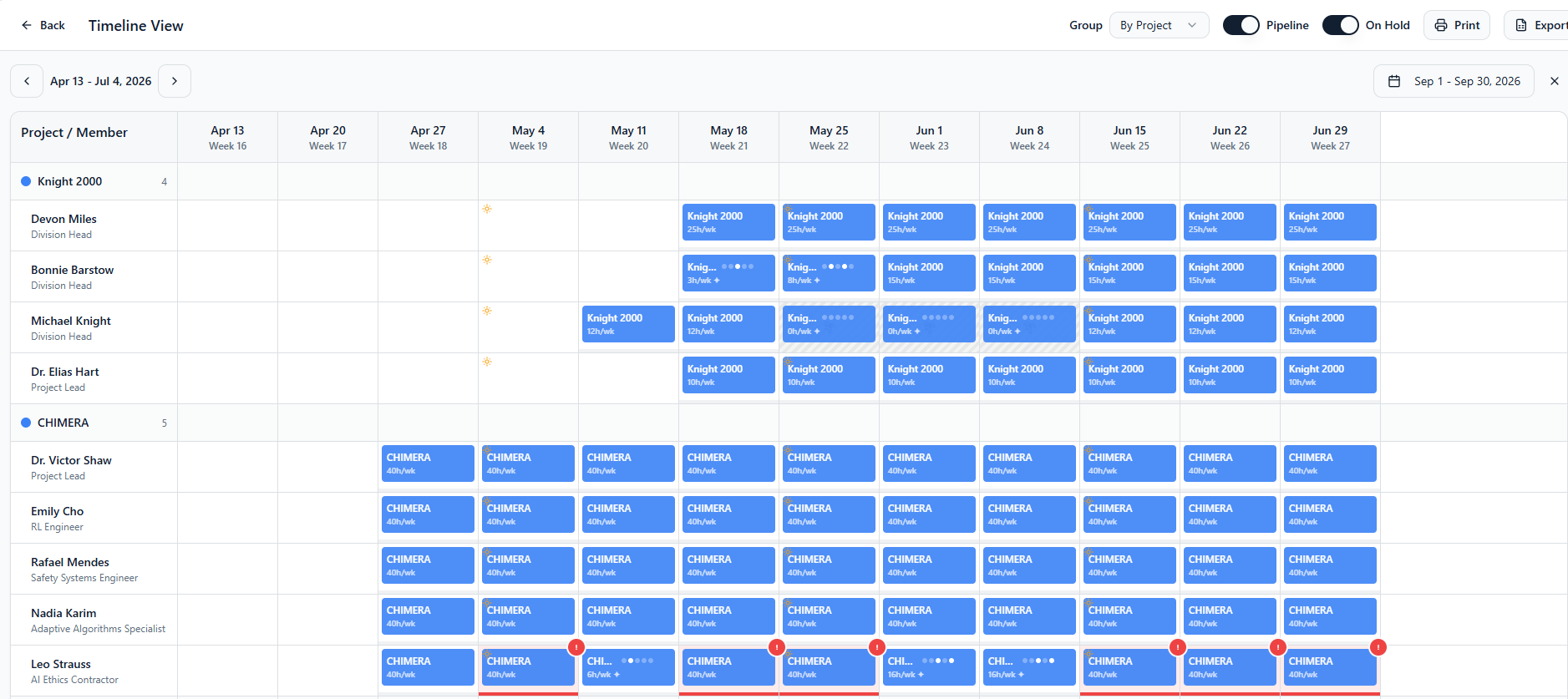
A shared resource team has a problem that single project teams usually do not. The same designer, developer or consultant appears on four projects at once, and each of those projects may live in a different tool with a different board, a different backlog and a different idea of what "on track" means. Task and project management software solves the visibility problem inside a project. It rarely solves the visibility problem across projects, and that gap is where shared teams lose time. Choosing task and project management software for a shared team therefore means asking a different question from the one a single project team asks.
The 2026 software market is crowded. One reviewer evaluated 21 project management tools in August 2026, another published a list of 20 or more options in September 2026, and agency-focused roundups already name eight or more tools each. Rather than add another list to the pile, this article looks at what task and project management software does well, where it stops, and how a team that shares people across projects should think about combining tools.
Why shared resource teams outgrow simple task and project management software
A task board answers a simple question: what work is left on this project? A shared resource team needs a second answer: who is free, and when? Those are different questions, and most task tools were designed for the first one.
Agency reviews describe the pattern well. Work starts to fragment when tasks live in one tool, updates surface in another, feedback gets buried in chat threads, and the real project status becomes an educated guess. For a team with dedicated people on a single project, that fragmentation is annoying. For a consultancy where three people are spread across six engagements, it becomes a scheduling risk, because nobody can see the collision until a deadline already looks shaky.
Small teams feel this early. A three-person team with several projects and no fixed timelines will still need to stay in lock-step, and a board that only shows one project at a time will not get them there.
What the main categories of tool actually do
The tools that keep appearing in 2026 reviews fall into a handful of recognisable groups. The table below maps the groups to the descriptions used in those reviews, which is a useful way to narrow a long shortlist before you look at pricing.
Descriptions in the table reflect how reviewers characterised each product. Features change quickly, so confirm current capabilities on the vendor's own site before you commit.

The names that keep appearing in 2026 shortlists
Certain products show up on almost every list, which is useful signal even if it is not a recommendation. ClickUp, Asana, Trello, Monday.com, Wrike, Jira, Notion and Basecamp all appear in agency-focused task management roundups. Paymo, Asana, Wrike, Jira, ProjectManager, Monday, ClickUp and Microsoft Project appear in a September 2026 list of top project management software. A separate 2024 comparison of personal project management tools named ClickUp, Trello, Asana, Wrike, Monday.com and Notion in the same breath.
Free tiers get their own attention. A 2026 review of free project management software singled out Trello for visually managing projects, Asana as a flexible app that can grow with you, and Wrike for spreadsheet-like features. That framing is worth keeping in mind, because the free plan you pick often determines the shape of your workflow two years later, and a free tier can quietly become the task and project management software your whole team depends on.
Time and capacity tools sit slightly apart from the rest. Toggl is described as a task and project management platform that pairs task tracking, scheduling and team assignment with native time tracking and capacity planning tools. That combination matters more for shared teams than for single-project teams, and it points at the real dividing line in this market.
Where task management stops and resource management begins
Most task tools will tell you a task is assigned to a person. Very few will tell you that the same person is already committed at 120 per cent across three other projects in the same fortnight. Assignment is not the same as availability, and the difference is the whole reason resource management exists as a separate discipline. It is also where task and project management software earns its place in a shared resource team.
Shared resource teams usually need four things that a standard task board does not provide:
-
One view of every person's commitments across all projects, rather than one project at a time.
-
Utilisation and capacity signals that flag overallocation before it leads to missed deadlines or burnout.
-
Skills and role filtering, so a request for a specific capability returns people who actually have it.
-
Billable versus non-billable visibility, so delivery managers and finance see the same picture.
Some tools in the table above cover parts of this. Time tracking products often add capacity planning, and enterprise scheduling tools handle resource assignment within a plan. The hard part is still answering a simple question quickly: who in this team has the right skills and enough room next month? In many organisations, that question goes to a PMO coordinator or a spreadsheet owner, and the answer comes back a day later.
A practical checklist before you commit
Choosing software is easier when you test it against your worst week rather than your best one. Work through this list while you still have trials running.
-
Map one real fortnight of work, including every person who appears on more than one project.
-
Check whether the tool shows cross-project load for an individual in a single view.
-
Test how quickly you can answer a skills question, for example who can cover a specific role next month.
-
Confirm how billable and non-billable time are separated, and whether that suits your finance reporting.
-
Review permission levels, because delivery managers, finance and contractors usually need different access.
-
Ask how the tool handles a project with no fixed timeline, which is common in small shared teams.
-
Check what the free or entry plan leaves out, since that is the plan most teams start on.
-
Confirm current pricing and plan limits directly with each vendor before signing anything.
Combining a task tool with a resource layer
- Task and project management software helps shared resource teams plan work, allocate people and track delivery in one place, so capacity planning fits naturally alongside scheduling and reporting.

Where Avai-lability sits alongside your task tool
Avai-lability is a resource management and revenue forecasting platform built for teams that share people across projects. It tracks utilisation and availability across shared resource pools, supports skills matching by skill, team, role and availability, and covers revenue and budget tracking across billable and non-billable work. Role-based access covers Owner, Admin, Manager, Member and Viewer, so finance and delivery can share the same source of truth without seeing the same screens.
The platform's AI Resource Assistant is designed for natural-language questions about availability, skills and allocations, which is the part task boards handle least well. Published pricing is per resource, per month: Standard at $4.89, Pro at $7.50, and Enterprise on a custom quote. The operating entity is Panairiam Pty Ltd. Treat those figures as a starting point and confirm them on the official site, since SaaS pricing and plan inclusions change.
Frequently Asked Questions
What is the difference between task management and project management software?
Task management software focuses on individual items of work, who owns them and what stage they are at. Project management software adds planning, scheduling, dependencies and reporting across a whole engagement. Many 2026 products blur the two, which is why reviewers increasingly compare them on the same lists rather than treating them as separate categories.
Can a task tool handle resource allocation for shared teams?
Partly. Task tools show who is assigned to what within a project, and some add time tracking or capacity features, as Toggl does. What most struggle with is the cross-project view: seeing every commitment for one person at once, plus utilisation and skills matching. That gap is usually filled by a dedicated resource management layer.
How many tools should a shared resource team run?
Fewer is better, but one is rarely enough. A workable pattern is one task and project management tool for delivery plus one resource management platform for availability, capacity and revenue. Add anything else only if it removes a manual step rather than adding another place for updates to hide.
Is free project management software enough for a small shared team?
It can be, at first. Reviews of free options in 2026 highlight Trello for visual project management, Asana for flexibility as you grow and Wrike for spreadsheet-style features. The risk is that free plans often lack the cross-project reporting and permission controls a shared team needs once several people work across multiple engagements.
How should we evaluate tools in 2026?
Start with your own worst week rather than a feature list. Run a real fortnight through each trial, test cross-project visibility, skills filtering and billable reporting, and check permission levels. Then verify current pricing and plan inclusions with each vendor directly, because published details change and reviewers' snapshots age quickly.