Project Plan: Build One with Clear Task Responsibilities
A project plan is only as useful as the names written into it. Plenty of plans describe the work well and still fail in delivery, because nobody can say who is doing what, who is allowed to decide, and where the hours are actually coming from. Building a plan with clear responsibilities from the first draft means the document answers those questions before anyone asks them.
This guide walks through the practical steps: setting goals, defining scope, listing deliverables, structuring tasks by stage, and attaching a single accountable owner to every line. It also covers the part most plans skip, which is making the allocation of tasks visible across every project that shares the same people.
What a project plan actually is
A project plan gives an overview of what a project needs. A schedule details when activities will be completed. The plan comes first in a project lifecycle, and the schedule is built from it. Keeping those two documents distinct stops a common problem, where a timeline gets treated as a strategy and the underlying assumptions about people, skills and funding never get written down.
Project planning is an essential project management process, used to define goals, resources, budget, deliverables, timelines and more. In practice, that means your plan should cover the outcome, the boundaries, the work required to produce it, the people needed, and how progress will be judged. Responsibilities sit across all of those, not just the task list.
Step 1: Define the project goals and success metrics
Start with the outcome the project exists to deliver, then write down how you will know it arrived. Success metrics give the plan a way to be tested later, and they also make responsibility conversations easier, because "done" stops being a matter of opinion.
Keep the goal statement short enough that a new team member can repeat it. If the goal needs three paragraphs, the scope is probably still unclear and the task list that follows will be too.
Step 2: Identify the scope and list the deliverables
Scope defines what is inside the project and, just as importantly, what is outside it. Write both. The exclusions are what protect your team when a neighbouring request arrives mid-delivery, and they give the person accountable for scope a clear basis for saying no or negotiating a change.
From there, list the deliverables as tangible outputs. Each deliverable should be something a person can point at when it is finished, which makes it far easier to assign than a vague activity like "improve reporting".

Step 3: Organise tasks across the stages of the work
A structured table for organising and recording project tasks across stages of the problem-solving process keeps the plan readable and stops tasks landing in the wrong phase. A plan template commonly works through six stages: Strategic Planning, Prioritisation, Contestability, Assurance, Sourcing and Operations. Those stages map neatly to the responsibility questions you need answered on every project.
You do not have to adopt those stage names exactly, but do decide on a small set of stages before you write tasks. Plans built straight into a flat list tend to grow duplicates and orphan items.
Step 4: Attach a name to every task
This is where most plans quietly fail. A task assigned to "the team" or to a department has no owner, because ownership means a person can be asked about it and can answer. Assign one accountable individual per task, even when several people contribute.
Write the acceptance criteria next to the task while the thinking is fresh. A short line describing what finished looks like gives the owner a target and gives reviewers something objective to check.
Columns a responsibility matrix needs
A responsibility matrix sits beside the task list and removes ambiguity about decision rights. Four columns are usually enough, and each task gets exactly one entry in the first column.

Step 5: Make the allocation of tasks visible across every project
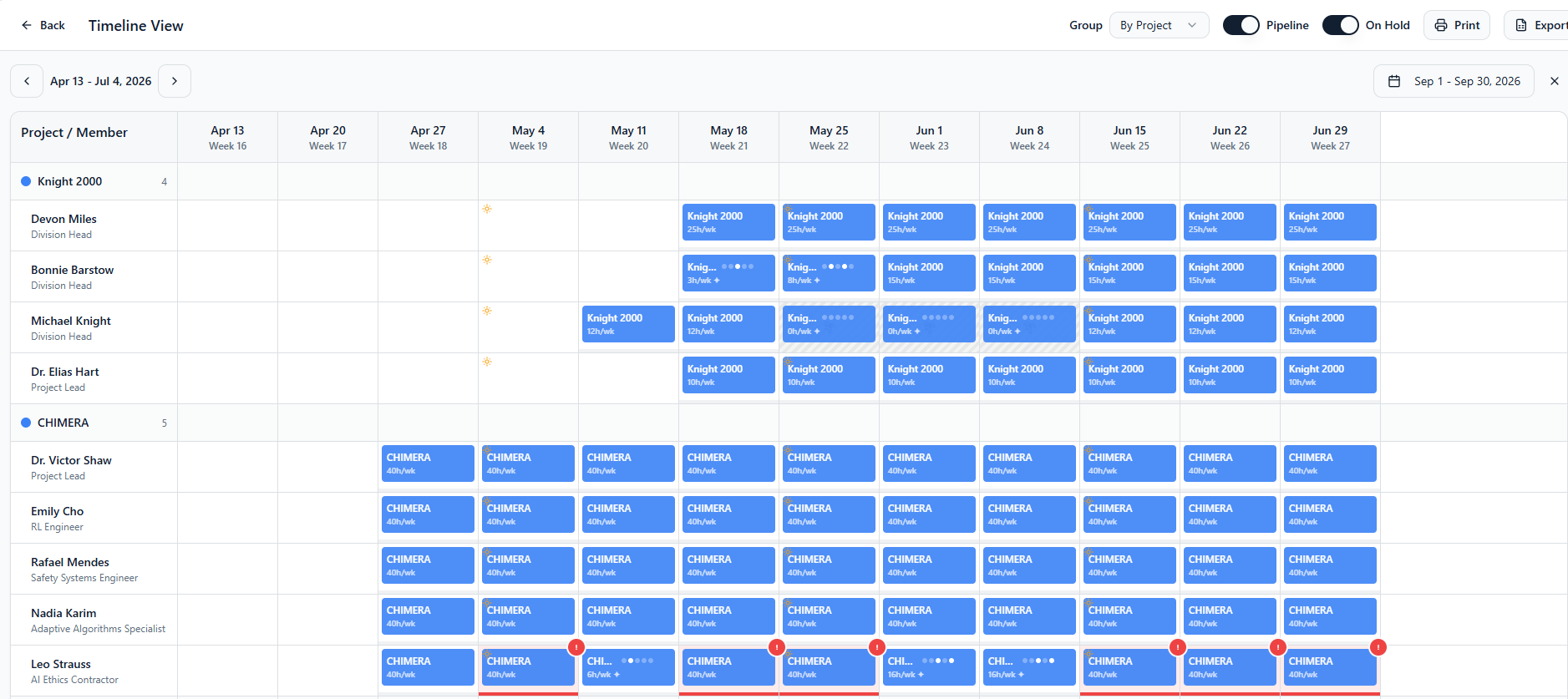
Clear responsibilities inside one plan are only half the job. The moment your team is shared across several projects, a plan that looks perfectly staffed in isolation can double book the same people in the same week. Visibility of the allocation of tasks across the whole portfolio is what turns a good plan into a deliverable one.
Three things need to be visible. First, who is committed to which task, on which project, for how long. Second, whether that person has the skills the task requires. Third, whether they have the capacity to take it on at the point the work is needed. A spreadsheet can hold the first of those for a while, but it rarely holds all three at once, and it goes stale as soon as the plan changes.
Resource management platforms exist to close that gap. Avai-lability, for example, tracks team utilisation and shared resource pools across projects, so a project manager can check availability and skills before a task is assigned rather than discovering the conflict during delivery. Its AI Resource Assistant supports natural-language queries about availability, skills and allocations, which shortens the loop between planning a task and confirming the right person can take it. Skills matching and filtering by skill, team, role and availability help planners avoid assigning work to whoever appears free first.
Access control matters here too. Role-based permissions such as Owner, Admin, Manager, Member and Viewer let a project manager see and adjust the allocation detail they need without exposing every commercial figure to the whole organisation.
Step 6: Build the schedule from the plan
Once tasks have owners, dependencies and acceptance criteria, sequencing becomes far more straightforward. The schedule then handles when activities will be completed, including milestones, review points and the order in which work must flow.
Check the sequence against real availability before you commit. A timeline that assumes a person can run two concurrent full-time tasks is not a plan, it is a hope.
Step 7: Add assurance and keep the plan alive
Assurance is the stage that tells you whether the plan is holding. Set a review rhythm early: a short weekly check on task progress and allocation, plus a deeper review at each milestone. The deeper review is where contestability earns its place, because it is the moment estimates and assumptions get tested rather than accepted.
Keep the plan in a place the team already uses. Project plans built for Microsoft Teams, PowerPoint and Excel exist precisely because plans that live outside the daily workflow stop being read.

A quick checklist for clear responsibilities
-
Every task has one named owner, not a team or a department.
-
Each task has a short definition of what finished looks like.
-
Decision rights are listed separately from delivery work.
-
Skills required are recorded against each task.
-
Availability has been checked across all projects sharing that person.
-
Dependencies and review points appear in the schedule, not just the task list.
-
Someone is accountable for keeping the plan current.
Frequently Asked Questions
What is the difference between a project plan and a project schedule?
A project plan gives an overview of what a project needs, including goals, scope, deliverables and resources. A schedule details when activities will be completed. The plan comes first in the project lifecycle, and the schedule is built from it. Treating them as the same document usually means the resourcing assumptions never get recorded.
Who should own a task in a project plan?
Assign one accountable person per task, not a team or a department. That person answers for delivery and decisions, even when several colleagues contribute. Support, consulted and informed people can be listed separately in a responsibility matrix so the owner knows who is helping and who must be consulted before sign-off.
How do I show task allocation clearly across multiple projects?
Track allocation at the person level across every project that shares them, alongside skills and availability. A single view showing who is committed where, for how long, and whether they have the required skills removes most double-booking. Resource management software is designed for this, because spreadsheets go stale quickly once plans start changing.
How often should a project plan be reviewed?
Review task progress and allocation weekly, and take a deeper look at each milestone. The weekly check catches drift before it becomes a delivery problem, while the milestone review is the right moment to test estimates and assumptions. Assign one person to keep the plan current so updates do not depend on someone noticing the plan has aged.